BYOB
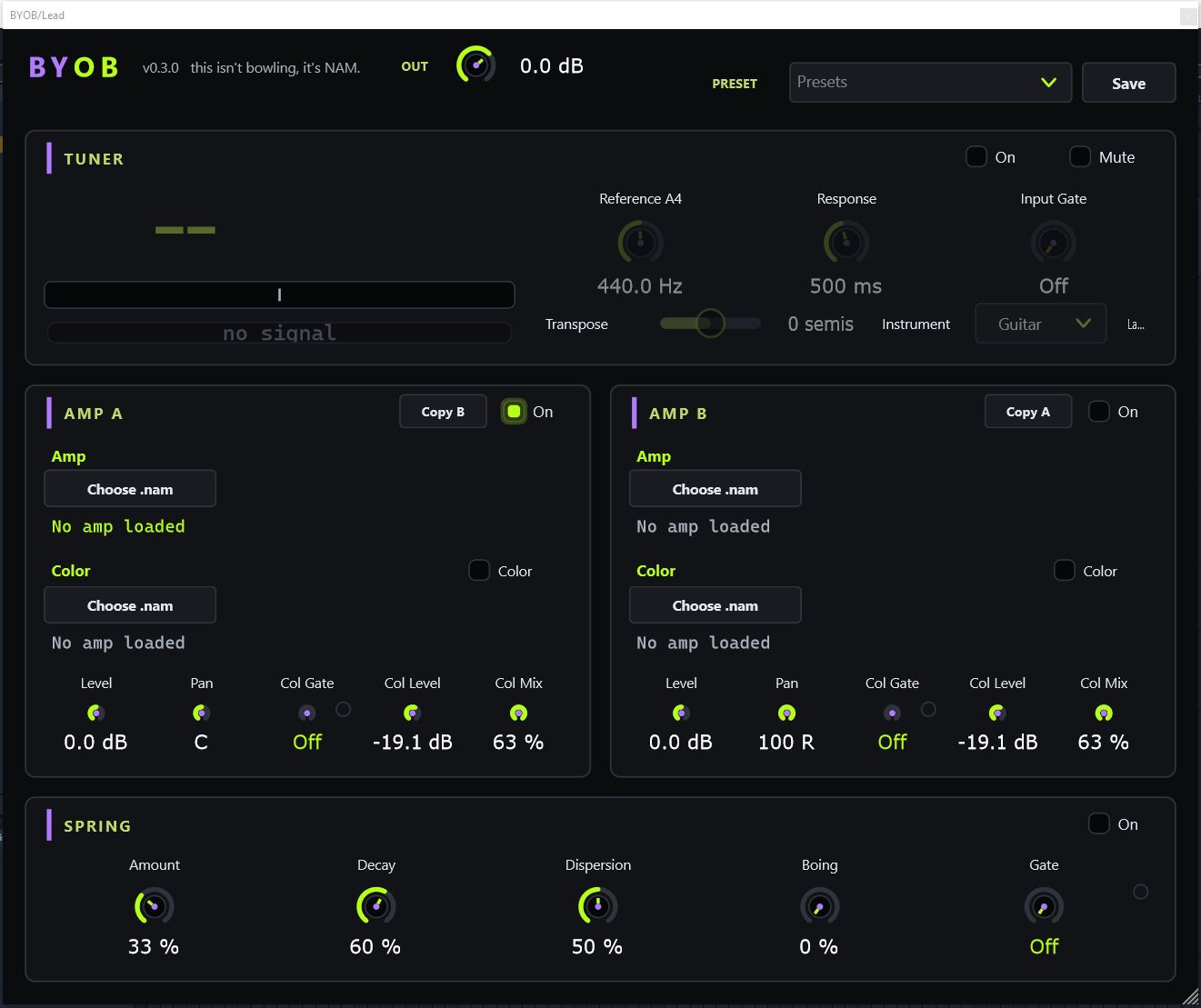
BYOB is a lean, free slice of the Illthy board. Two channels, each with a slot for your amp capture and a slot for your dirt capture, a spring reverb to wet it down, and a tuner. It ships with no tones baked in — the whole idea is you bring your own.
Plays Neural Amp Modeler (.nam) profiles via NeuralAmpModelerCore by Steven Atkinson (MIT) — the creator of NAM. Captures come from the community: browse and grab thousands at Tone3000. Huge thanks to the NAM project and the Tone3000 library — BYOB just loads what they made possible.
- Unzip BYOB-0.3.0-win64.zip.
- Drop the BYOB.vst3 folder into your VST3 folder — on Windows that’s C:\Program Files\Common Files\VST3\.
- Open your DAW (Ableton, Reaper, etc.) and rescan your plugins if it doesn’t show up right away.
- Add BYOB to a guitar track and you’re in.
BYOB plays .nam files — little captures of real amps and pedals made with Neural Amp Modeler. The best place to get them is Tone3000 — thousands of NAM captures, most of them free, from the whole capture community. Head over, grab a couple, and keep them in a folder you’ll remember.
You want two of them:
A NAM for your amp — a whole amp (and usually its cab), clean or crunchy. This is your core tone. Load it into the Amp slot.
A NAM for your dirt / color — an overdrive, fuzz, or boost pedal. This is your grit. Load it into the Color slot and blend it in.
Tip: if an amp capture already includes a cab, you’re done — no separate impulse response needed. If it’s an amp-only capture, it’ll sound fizzy on its own (that’s normal for a DI-into-power-amp capture).
- Make sure Amp A is On. Click its Amp button (“Choose .nam”) and pick the amp NAM you grabbed from Tone3000. It loads and levels itself automatically — every capture comes in at a matched volume, so swapping amps won’t blow your ears out.
- Tick the Color checkbox on, click its Choose .nam and pick your dirt / color NAM. Blend it against the clean amp with Col Mix, drive how hard the signal hits the capture with Col Level, and choke pedal hiss between notes with Col Gate.
- Set the channel’s Level and Pan. Want a second, different rig? Switch Amp B on, load its own amp + color (or hit Copy A to clone channel A, then tweak), and pan the two apart for a wide double-tracked sound.
- Turn the Spring reverb on and dial Amount, Decay, Dispersion and Boing to taste. Tune up on the Tuner, set the master OUT up top, and hit Save in the header to keep the whole setup as a preset. Done.
| Header (top bar) | |
|---|---|
| OUT | Master output — the final level of the whole plugin. |
| Presets | Dropdown to recall a saved setup, including the .nam files you loaded. |
| Save | Stores the current state as a preset. |
| Each channel — Amp A & Amp B | |
| On | Turns the channel on/off (an off channel costs nothing). |
| Copy B / Copy A | Clones the other channel onto this one in a click, then tweak from there. |
| Amp | “Choose .nam” — loads your amp capture, the core tone. Auto-levelled on load. |
| Color | An on/off checkbox plus “Choose .nam” — loads a dirt / color capture (overdrive, fuzz, boost). Your grit stage; switch it off to bypass. |
| Col Gate | Noise gate on the color — silences pedal hiss/hum between notes. Fully down = off. |
| Col Level | How hard the signal drives into the color capture. |
| Col Mix | Blend of the color against the clean amp — 0% = no color, up = more. |
| Level | Channel volume into the mix. |
| Pan | Places the channel in the stereo field — pan A and B apart for width. |
| Spring reverb | |
| On | Switches the spring reverb in or out. |
| Amount | Wet amount — how much reverb sits on the sound. |
| Decay | How long the tail rings out. |
| Dispersion | The springy chirp character — more = more of that classic spring smear. |
| Boing | The spring bounce — dials in the mechanical “boing” of a real tank. |
| Gate | Silences the reverb feed when you stop playing, so it doesn’t hum. Down = off. |
| Tuner | |
| On | Engages the tuner. |
| Mute | Kills the output while you tune, so nobody hears it. |
| Reference A4 | Tuning reference (e.g. 440 Hz; drop to 432 or lower for period tuning). |
| Response | How snappy vs. rock-steady the strobe reads. |
| Input Gate | Ignores quiet noise so the tuner locks cleanly. |
| Transpose | Reads the note as if capo’d / transposed by a set number of semitones. |
| Instrument | Guitar / Bass / Wide detection range. |
| Labels | Note names as Sharps or Flats. |