ChordThingchords, streams and finger rolls
Windows 64-bitVST3 + standaloneoffline license
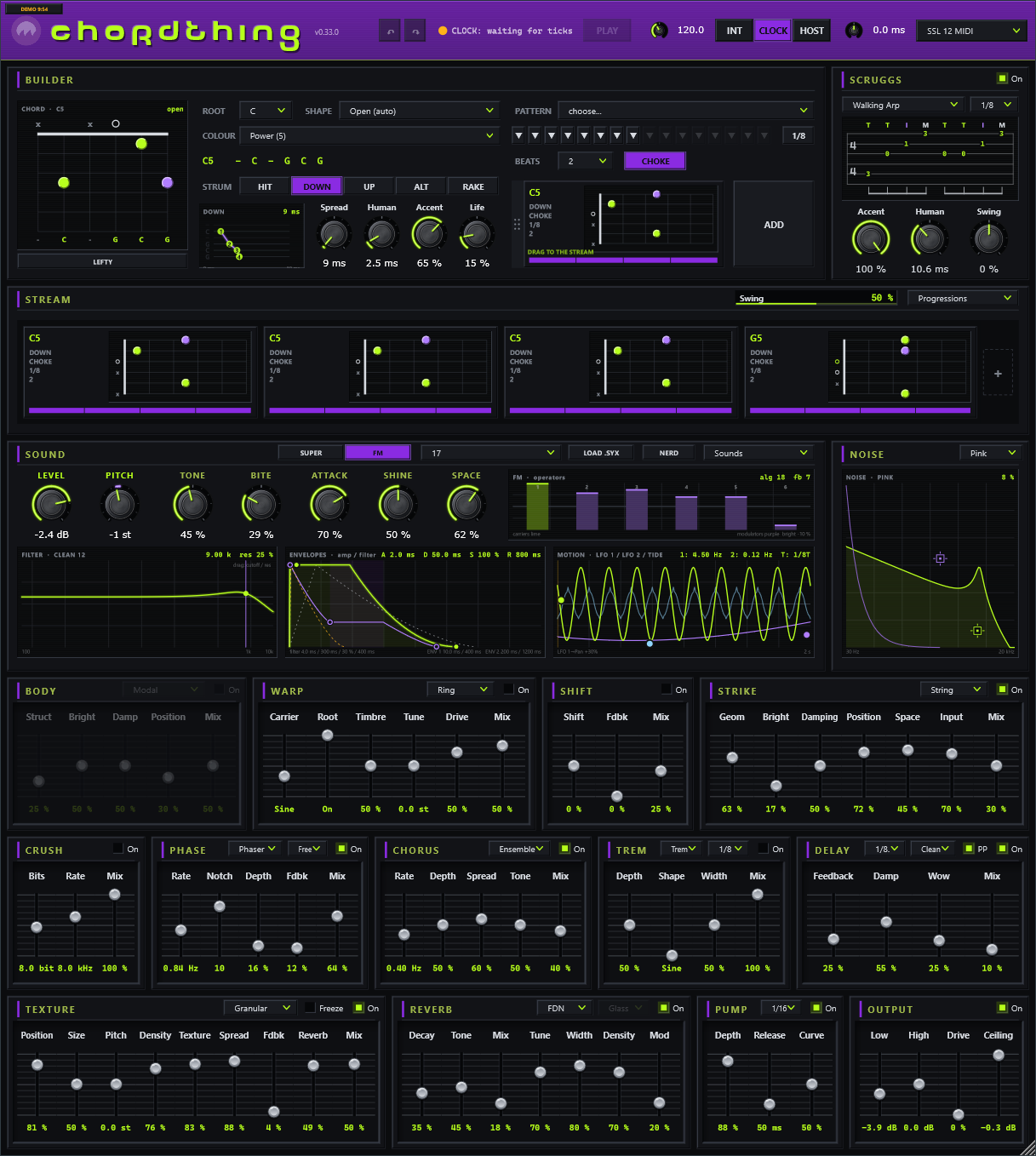
ChordThing is a chord synth for the guitar-brained. Pick a chord on a fretboard, give it a strum or a finger
roll, build a progression in the stream and watch it flow. Under it sits a full synth with two engines,
a modulation router and thirteen effects in the order the signal meets them. Play along over it, write over it,
or use it as the band.
Quick start
- Install. Close your DAW. Copy
ChordThing.vst3 into
C:\Program Files\Common Files\VST3 and rescan plugins. ChordThing.exe runs on its own,
no DAW needed: put it anywhere, double-click it, and pick your audio device under Options > Audio/MIDI
Settings.
- Press PLAY. A fresh ChordThing already has four chords in the stream. You hear them strummed at 120 BPM.
- Click a chord plate in the stream. The builder above shows it. Change its ROOT, COLOUR or
strum and the plate changes while it plays.
- Pick a sound from the Sounds menu on the SOUND card. The SOLO BEDS section is voiced to
leave room for a guitar on top.
- Build your own. Set a chord in the builder and drag its preview (bottom right of the builder) down into
the stream, or press ADD. Save the result from Progressions > Save progression as...
| Control | What it does |
|---|
| License chip | In the header, right of the ChordThing name: DEMO m:ss, TRIAL nD, MUTED or your name. Click it to load a license file or get one. See License and demo. |
| ↶ ↷ | Undo and redo. Also Ctrl+Z, and Ctrl+R / Ctrl+Y / Ctrl+Shift+Z. |
| Status | The light and the line beside it say what the clock is doing: INT, HOST rolling or parked, CLOCK locked or waiting. |
| PLAY | Starts and stops the stream (in INT, and in HOST while the host is stopped). |
| BPM | The tempo when ChordThing is its own clock. |
| INT / CLOCK / HOST | Where the tempo and the start come from. See Tempo and sync. |
| ms | Clock offset: nudges the stream earlier or later against an external MIDI clock. |
| Port | The MIDI input the CLOCK mode listens to (standalone). |
Double-click the header band to make the window fill your screen's height (again to shrink it back).
The builder
The builder is where one chord is made. Whatever it shows is the selected plate in the stream: every change
lands on that plate (and on every other selected plate, see The stream). With nothing
selected the builder is a scratchpad you can drag into the stream.
The chord
- The diagram shows the voicing on six strings. Click a fret to change a string by hand; the chord becomes
custom. LEFTY flips every diagram for left-handed players.
- ROOT and COLOUR pick the chord (major, minor, sevenths, suspended, power chords and more).
- SHAPE picks where on the neck it is voiced: the five forms (E, A, C, G and D shapes) or
Open (auto), which takes the lowest form for the root. A chord that fits from the nut is always drawn from
the nut; a higher one shows its fret number bottom-left.
- The line under COLOUR spells the chord's notes string by string.
Strums and patterns
A chord's strum is how the strings are hit; its pattern is when.
- HIT plays every string at once, DOWN and UP sweep across them, ALT follows the
pattern's down and up cells, RAKE is a short, scratchy sweep. The little screen shows the sweep string by
string and lights each string as it sounds.
- Spread is how long the sweep takes (up to half a second). Human scatters the timing and the
force of each string. Accent lifts the beats above the off-beats. Life lets every string move on
its own after it is hit: a little vibrato, drift in pitch, tone and level.
- PATTERN loads a factory or saved pattern. The cells under it are the rhythm: click a cell to cycle
it (rest, down, up, chop), right-click to rest it. The button at the end switches the grid between eighths and
sixteenths.
- BEATS is how long the chord lasts in the stream. RING / CHOKE: ring into the next chord, or
choke the strings when the next chord starts.
The stream
The stream is the song: chord plates side by side, each as wide as its length. Up to eight fill the lane; more
than eight scroll, with arrows at the ends. While it plays, the lane follows the playhead.
| Do this | To |
|---|
| Click | Select a plate (the builder shows it). |
| Ctrl+click | Add a plate to (or take it out of) the selection. An edit in the builder lands on every selected plate. |
| Shift+click | Select every plate from the selected one to this one. |
| Drag | Move a plate. |
| Ctrl+drag | Copy a plate (or the touching group it belongs to). A ghost follows the mouse; drop it where the marker shows. |
| Right-click | Duplicate, ring or choke into the next chord, delete. A selected group that is all touching duplicates whole, in order, after its last plate; a group with gaps cannot be duplicated (the item is greyed). |
| x / + | The little x on a plate deletes it. The + at the end adds the builder's chord. |
Swing pushes the off-beats late (or early). Progressions loads a factory progression, grouped by
mood, or one you saved.
SCRUGGS, finger rolls
SCRUGGS sits beside the builder. Switch it On and every chord in the stream is picked instead of
strummed, in a repeating 8-step roll. Switch it off and nothing about your stream has changed.
- A roll is written in roles, not strings, so one roll fits every chord: the thumb's bass (the lowest
string of the chord), the thumb's alternate bass, and the G, B and high E strings. Two roles on one step pick
together (a pinch).
- The screen is the roll as tab on the chord being played: the time signature, the fingers above
(T thumb, I index, M middle, P pinch), the real frets on the strings, and beamed notes below. While the stream
plays, the step under the playhead lights up.
- Edit a roll by clicking a string's line in a step: add a note there, or take it away.
- The menu holds the factory rolls (forward, backward, forward-reverse, alternating thumb and more) and your own:
Save roll as.... The rate picks 1/8, 1/16 or triplets.
- Accent lifts the thumb and the beat. Human loosens the timing. Swing pushes the off-steps.
The sound
Two engines, chosen at the top of the SOUND card: SUPER, a model-based synth voice (analog shapes,
strings, bars, plucks, particles and more, plus a second oscillator), and FM, a six-operator FM voice that
also loads .syx banks (LOAD .SYX).
- LEVEL and PITCH (transposes the whole sound in semitones, to tune to other instruments).
- Five macro knobs. Their names and jobs follow the engine and the model: each one moves several
controls at once.
- The screens: the engine (what the voice is doing), FILTER (drag the node: cutoff left-right,
resonance up-down), ENVELOPES (the amp and the filter envelopes; drag the nodes), MOTION (the two
LFOs and the tide; drag the edge nodes, right-click for sync and shape).
- The Sounds menu: PADS, SYNTH, PLUCKS, ORGANS, TEXTURES, FM KEYS and SOLO BEDS, plus your own
(Save sound as...). A sound carries its effects and its modulation routes.
NOISE
NOISE adds coloured noise to every string of the voice, before the filter, so it breathes with the sound: air on
a pad, a pick's scrape, a hammer, dust, surf. The colour is picked in the device's header: white, pink, brown, blue,
violet, or crackle. The screen shows the noise's spectrum and its decay, with two nodes you drag anywhere:
- The green node: Tone (left-right, it sits on the frequency) and Level (up-down; at the
bottom the noise is off).
- The purple node: Decay (left-right: a short chiff at the left, held with the note at the far right)
and Focus (up-down: broad at the bottom, one narrow ringing band at the top).
Right-click a node to modulate or MIDI-learn either of its two controls.
NERD, every control
The NERD button opens a window with every control of the voice, laid out in rows:
- SUPER: OSC A (its own envelope, the model's three hands, its level, drift) and OSC B
(its wave and octave, its own envelope, semitone, fine, level and width). Each oscillator's envelope shapes it
before the filter, so one can swell in under the other.
- FM: ENGINE (the algorithm, the six operator levels, feedback, LFO depth, envelope scale,
brightness) and SHAPE (the selected operator's tuning and its envelope).
- FILTER, AMP, MOD (the two LFOs, the tide, dice and the two envelopes), and
ROUTES, the list of every modulation route.
Modulation
Right-click any knob or slider to route a modulation source to it, at any amount, positive or negative.
The sources: LFO 1, LFO 2, ENV 1 and ENV 2 (they restart on every strum),
TIDE (a shaped, smooth cycle), DICE (a new random value every step), and OSC A and
OSC B (the two oscillators' own envelopes). A routed control shows a coloured band of its range and a tick
where it is right now. Alt+drag a routed control to trim its amount. The ROUTES list in NERD shows them all: click
a name to open its menu, x removes it.
The effects
Thirteen devices, read left to right and top to bottom in the order the signal meets them. Each has an
On switch; switching fades in and out rather than cutting.
| Device | What it is |
|---|
| BODY | A resonating body inside the voice: modal, sympathetic strings, strings with a room. |
| WARP | The voice against a carrier (crossfade, fold, ring, digital ring and more). Root makes the carrier follow the chord. |
| SHIFT | A frequency shifter: from a shimmer to a barber-pole. |
| STRIKE | The whole mix through a struck body tuned to the chord. |
| CRUSH | Bits and sample rate, for grit and lo-fi. |
| PHASE | Phaser or flanger, free or synced (up to four bars). |
| CHORUS | An ensemble, or the classic stereo pair (I, II, I+II). |
| TREM | Tremolo or auto-pan, synced to the tempo. |
| DELAY | Synced delay, clean or tape (with wow), ping-pong. |
| TEXTURE | Granular, stretch, looping delay and spectral clouds, with freeze. |
| REVERB | FDN, BLOOM (an ambient tank) or PLATE. Tune makes the tail ring in the chord's notes. |
| PUMP | A tempo-synced duck, for the breathing pad sound. |
| OUTPUT | Low and high shelves, gentle drive and a ceiling limiter. Always last. |
Tempo and sync
- INT: ChordThing is the clock. BPM sets the tempo; PLAY starts and stops.
- HOST (in a DAW): the host's tempo and transport drive the stream. While the host is stopped, PLAY still
runs the stream on ChordThing's own tempo.
- CLOCK (standalone): follow a MIDI clock on the port you pick. The status shows when it is locked; Start
plays, Stop parks. The ms knob moves the stream earlier or later to line it up by ear.
MIDI learn
Right-click a control and choose MIDI learn, then move a knob or press a button on your controller.
Learned mappings are remembered on this computer.
Undo, colour schemes, updates
- Undo / redo covers every control you touch, every chord and stream edit, and modulation routes. Loading a
sound or a progression undoes in one step.
- Colour schemes: Options > Colour scheme in the standalone, or right-click the header band in a
DAW. ChordThing (the house colours), Black Panel, Midnight, High Contrast (colour-blind safe), Light, Tweed.
- Check for updates: the last item of the same menu. It asks illsea.com for the newest version and, if
there is one, offers the download page. Nothing else is sent.
Presets and your files
Everything you save lives in %APPDATA%\IllSea\ChordThing\, in folders named Sounds,
Progressions, Patterns and Rolls: one small file each, easy to back up or
share. Your session (the stream, the sound, the roll) is saved with your DAW project, and by the standalone when
it closes.
License and demo
Without a license ChordThing is a full demo: everything works, and the sound plays for
10 minutes each session, then fades out gently (the chip says MUTED). Reopen it for another 10.
A trial license lifts that for 30 days; a full license is yours for good.
- Your license arrives by email as a small file. Click the license chip (in the header, right of the ChordThing name),
choose Load license file... and pick it. It works offline, forever, on all your computers.
- The license is personal: your address is signed into the file and shown on the chip.
- ChordThing MIDI, the version that plays your other synths from the same builder, stream and rolls, comes
with your ChordThing license, free.
ChordThing MIDI
ChordThing MIDI is ChordThing without its own sound: the builder, SCRUGGS, the patterns and the stream play
any instrument instead, as MIDI notes with the same timing, strums, rolls and humanising. It comes with your
ChordThing license (the same file unlocks both). It installs as its own plugin, ChordThing MIDI.vst3, and
its own standalone, ChordThing MIDI.exe.
- Where the SOUND card and the effects were, the MIDI OUT device: the channel layout and channel in its
header, then Octave, Velocity (the curve: softer or harder), Ring (a note rings until the string
is struck again or choked, or for a fixed 1/16 to 1 bar), Bend (the bend range) and Life. The monitor
shows each string's last note, its channel and its velocity, lit as it goes out.
- INSTRUMENT INSIDE (right of the monitor): LOAD... lists the VST3 plugins installed on your
computer (or browse for one). Pick a synth or a sampler and ChordThing MIDI plays it inside itself: its sound
comes out of ChordThing MIDI, on the same track. No MIDI routing, works the same in every DAW. OPEN shows the
instrument's own window (pick its patch there), REMOVE takes it out. The instrument and its patch are saved
with your project. The notes still go out as MIDI as well.
- One channel (the default) works with any instrument. Per string puts each string on its own channel,
the low E on the chosen one. MPE puts the strings on channels 2-7 and sends LIFE as real per-string pitch bend
and tone (CC74) to MPE instruments.
- Every note ends cleanly: when the string is struck again, choked, when its Ring length runs out, and when the
transport stops.
- The standalone sends to the MIDI output you pick in Options > Audio/MIDI Settings: a hardware synth,
or a virtual MIDI cable into any program.
- In the demo, after 10 minutes in a session every note ends and no new notes go out (the chip says MUTED).
- In a DAW a new ChordThing MIDI (and ChordThing) starts in HOST sync: press the DAW's play and it
follows the DAW's tempo and position. With the DAW stopped, ChordThing's own PLAY still runs it.
Two ways to use it in a DAW
- Instrument inside (the easy way): put ChordThing MIDI on an instrument track, click LOAD... in
INSTRUMENT INSIDE and pick your synth. Done: one track plays.
- Its MIDI into another track: leave INSTRUMENT INSIDE empty. On a second track with your synth, choose
ChordThing MIDI's track as the MIDI input (in Ableton Live: MIDI From = the ChordThing MIDI track, the chooser
under it = ChordThing MIDI, Monitor = In). Use this to play an instrument that lives on its own track,
or hardware.
Troubleshooting
- No sound: check the license chip (MUTED means the demo time is up for this session), the LEVEL knob,
and in the standalone your audio device under Options.
- It doesn't start in my DAW: in HOST mode the stream follows the host's transport. Press play in the
host, or press ChordThing's own PLAY while the host is stopped.
- CLOCK never locks: pick the right port, make sure the sending device actually sends clock, and watch
the status line.
- Crackles: raise your audio buffer size, and turn off devices you are not using (TEXTURE and the
reverbs are the heaviest).
- More: tips & troubleshooting, or write to [email protected].
The Illthy line