Ill SeaILL SEA
ChordThing● coming soon● out now
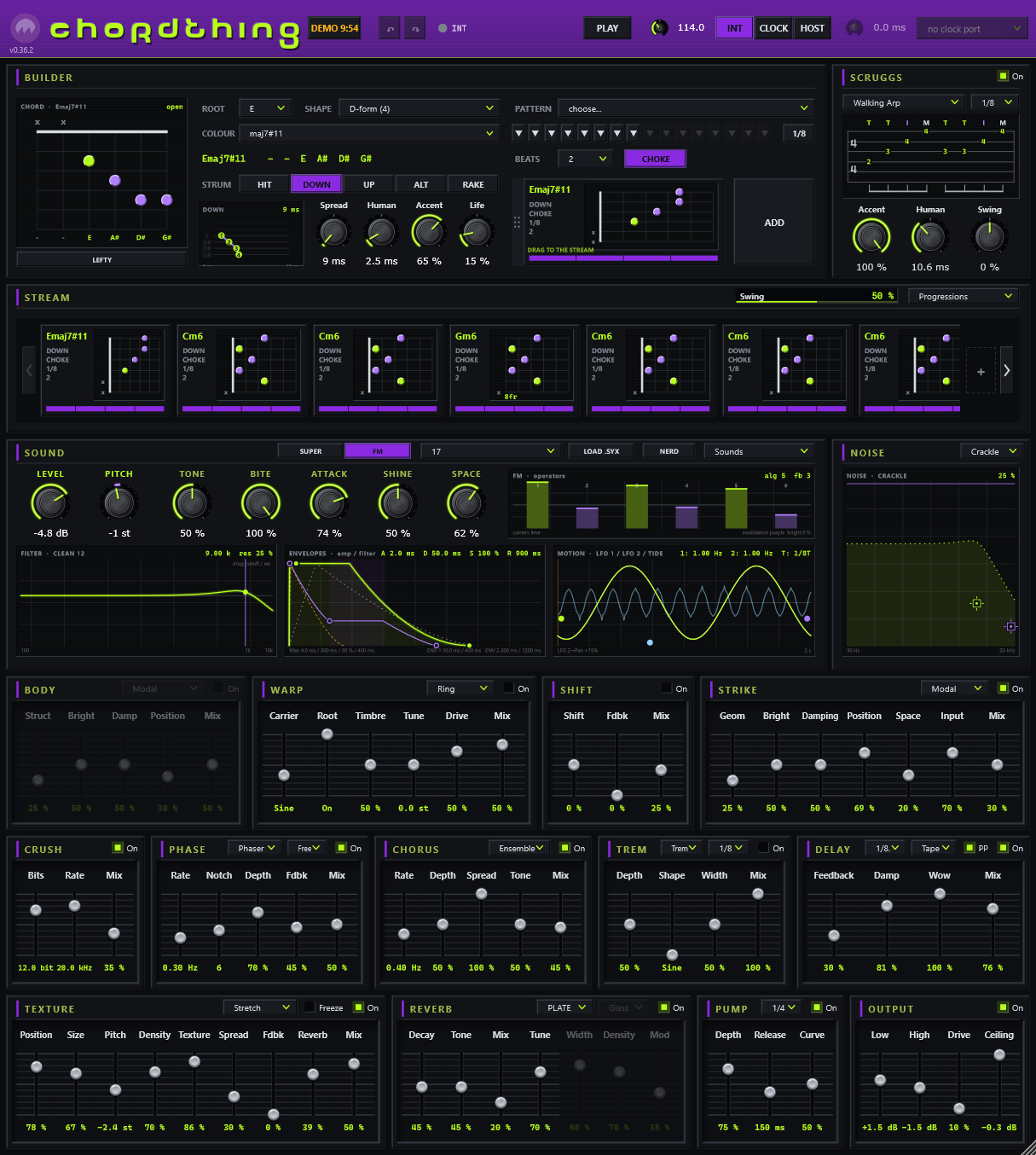
ChordThing in one window: the chord builder, SCRUGGS finger-roll tab, the stream of chord plates, the sound card with its screens, the NOISE screen and the effects
chordthing

a chord synth for the guitar-brained

Pick a chord on a fretboard. Give it a strum, a rake, or a finger roll. Build a progression in the stream and watch it flow: a band to play over, write over, or lean on. Bring your own synth with ChordThing MIDI.
STATUSCOMING SOONOUT NOWPRICE$30 · LAUNCH $10INCLUDESCHORDTHING MIDITRIAL30 DAYS, NO CARDFORMATWIN64 VST3 + STANDALONE
How it plays
Builder + Scruggs
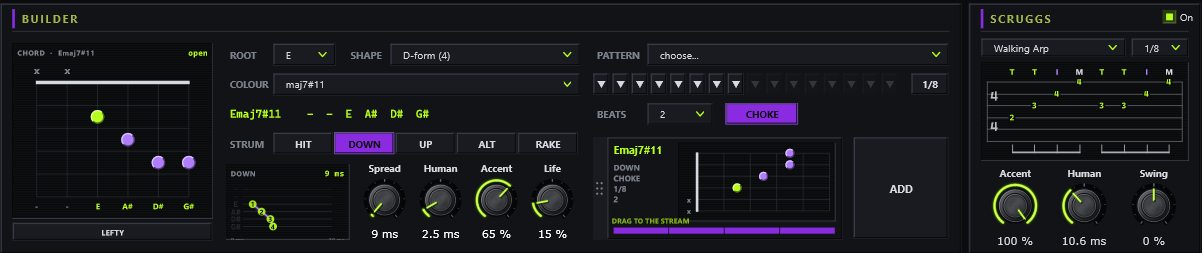
The builder: a fretboard diagram of the chord, root, colour and shape, the strum and its pattern; SCRUGGS on the right with a finger roll written as tab

Builder. Every chord in five neck positions or open, drawn as you’d finger it. Pick a root, a colour and a shape; strum it down, up, alternating or as a rake, with spread, human timing, accents and per-string life. Lefty mode flips every diagram.

SCRUGGS. Banjo-style finger rolls on any chord, written out as tab on the screen. Edit a step, save your own rolls. Off, it does nothing at all.

Stream
The stream: a row of chord plates, each with its name, strum and length

Drag chords into the stream and press play. Every plate keeps its own strum, pattern and length; it plays in time with your DAW, or on its own clock. Swing it, duplicate a run, or pick a whole progression from the menu.
Sound + Noise
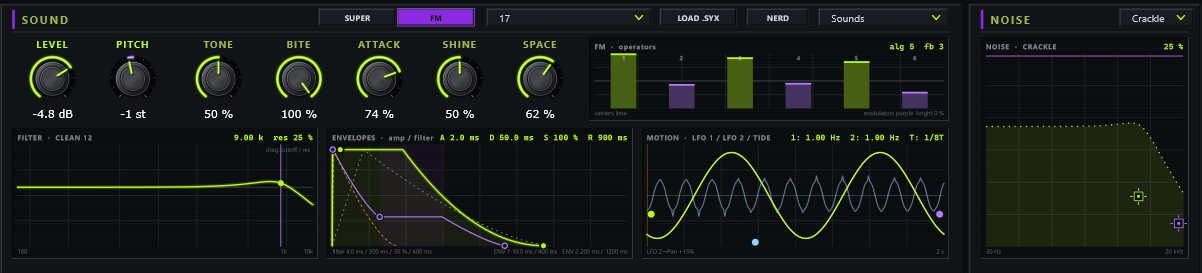
The sound card: two engines, the filter, envelope and motion screens, and the NOISE screen

Two engines, Super and FM, with a screen for everything that moves: the filter, the envelopes, the motion. Any control takes any source: LFOs, envelopes, tide, dice, the oscillators. NOISE adds crackle, air or tape under it.
Thirteen effects
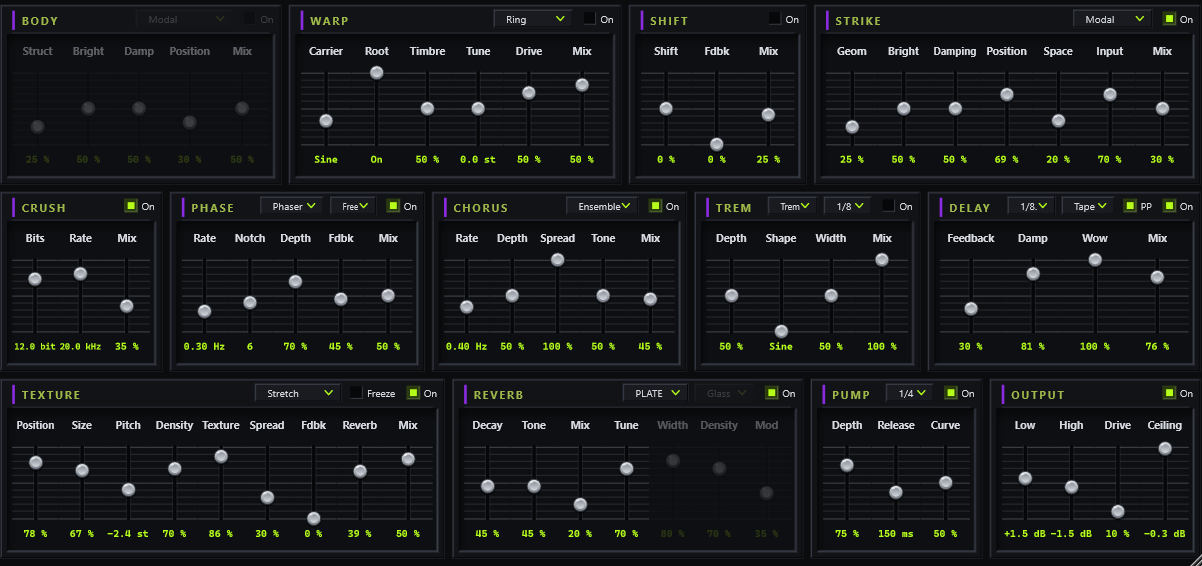
Thirteen effects in signal order: body, warp, shift, strike, crush, phase, chorus, trem, delay, texture, reverb, pump and output

Laid out in the order the sound meets them, from body and crush to delay, reverb, pump and an output stage. One slider pitch, one look, each one off until you want it.
ChordThing MIDI: the same hands, any instrument
ChordThing MIDIincluded
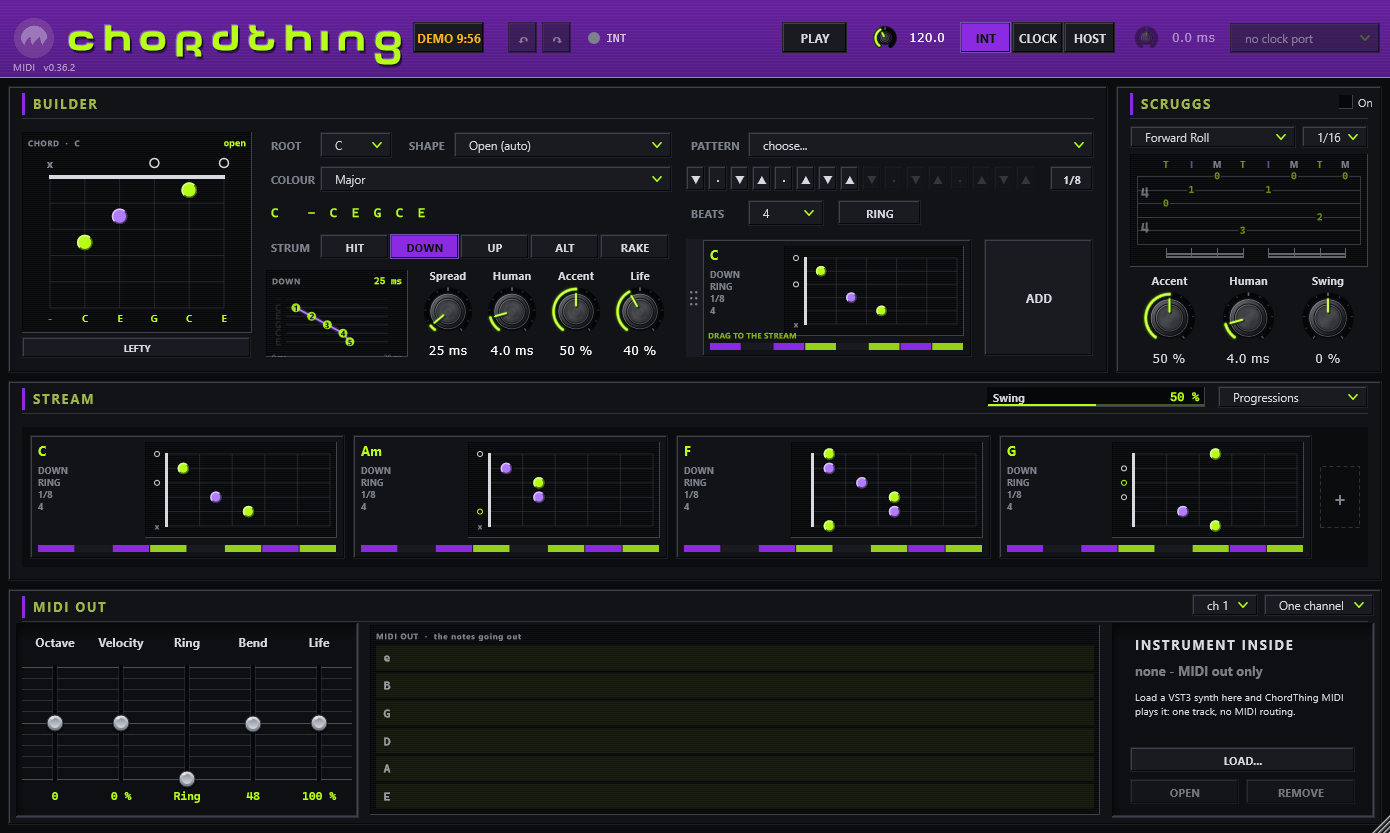
ChordThing MIDI: the builder, SCRUGGS and the stream, and the MIDI OUT device with the six-string monitor and INSTRUMENT INSIDE

Some people want ChordThing for its hands, not its sound. ChordThing MIDI is the builder, the patterns, the rolls and the stream, playing any instrument instead: your favourite synth, a piano library, a hardware synth through the standalone.

Instrument inside: load a VST3 synth into ChordThing MIDI and it plays it on its own track, no routing. Or send the notes out to another track, on one channel, a channel per string, or MPE.

CHANNELSONE · PER STRING · MPEINSIDEANY VST3 INSTRUMENTLICENSETHE SAME FILE
Buying from Ill Sea
Straight answersIll Sea LLC · Seattle, WA
Secure checkoutCard payment through Stripe. Your card details go to Stripe, never to us.
Try it, then decide30 days free, no card needed. Bought it and it isn’t right? Tell us within 14 days: we fix it or refund you.
Yours, offlineYour license is a small file. No account, nothing phones home.
Updates are freeEvery future version works with the license file you already have.
Signed softwareWindows binaries signed by Ill Sea LLC, so Windows knows who made them.
A real person[email protected]. We usually reply within a day or two.
Get it: $10 while the launch promo lastsComing very soon
Notify me

Coming very soon

ChordThing and ChordThing MIDI are in final testing. Drop your email and we’ll ping you the moment they’re out, launch price and all. That’s the only thing this list is for.

No spam, no list-selling. One heads-up when it’s live.

Buy it

$30. Or type CHORDLAUNCH at checkout while the promo lasts and it’s $10. ChordThing and ChordThing MIDI, one license, offline, yours forever, and updates are free, always. Not right for you? Refund within 14 days.

CheckoutStripe · card · instant license
Card checkout through Stripe. License + download land the second you pay.
By checking out you agree to the License & Disclaimer: provided “as is,” no warranty, your ears, gear and computer at your own risk.
Try it free

30 days, both of them, the whole thing, no card. One trial per email, ever.

Start the trialinstant license file
Your license file + the software download link appear right here (and by email).
By starting the trial you agree to the License & Disclaimer: provided “as is,” no warranty, your ears, gear and computer at your own risk.
From zero to a playing stream in five steps
Quick start
  1. Get it and install. Buy or start the free trial; the download link arrives with your license (on screen and by email). Copy ChordThing.vst3 and ChordThing MIDI.vst3 into C:\Program Files\Common Files\VST3, put the two .exe files anywhere. Rescan in your DAW, or double-click an exe.
  2. Press PLAY. A fresh ChordThing already has four chords in its stream. In a DAW it follows your transport; on its own it plays at 120 BPM.
  3. Change a chord. Click a plate in the stream; the builder shows it. Change its root, its colour, its strum, and hear it change while it plays.
  4. Pick a sound. The Sounds menu has pads, synths, plucks, organs, textures, FM keys and solo beds (voiced to leave room for a guitar on top). Switch SCRUGGS on for finger rolls.
  5. License. Click the license chip (in the header, right of the ChordThing name), then Load license file. Done, forever, offline. The same file unlocks ChordThing MIDI.

Everything else: the ChordThing manual.

Questions
Before you buy
What do I need?
A Windows 10 or 11 PC (64-bit). Use ChordThing as a VST3 in your DAW, or on its own as a standalone app, no DAW needed. There is no Mac version yet.
Is ChordThing MIDI included?
Yes. One license unlocks both ChordThing and ChordThing MIDI, which plays any instrument in your DAW, or a VST3 synth loaded inside it.
How does the trial work?
Enter your email: a 30-day license file and the download link appear on screen and arrive by email. The whole thing, no card. One trial per email.
What happens without a license?
Everything works for 10 minutes per session, then the sound fades out (ChordThing MIDI stops its notes). Load a license file and it is back at once.
Do I need to be online?
Only to download. Your license is checked on your own computer, and ChordThing only looks for a new version when you choose Check for updates.
What if it isn’t right for me?
Write to [email protected] within 14 days of buying. We’ll fix the problem, or refund the full price if we can’t or it simply isn’t for you. The details.
Are updates free?
Yes. Every future version works with the license file you already have.
Something not working?
Write to [email protected] or use the contact form. A real person reads it, usually within a day or two.
Also from Ill Sea
NoAMP$40 · launch $10
noampEverything but the amp: your .nam captures on a full board.
See it
Free pluginsfree
toonz + winesA strobe tuner and a real wah, on the house.
See it