Windows 64-bitVST3 + standaloneoffline licensev0.314
Your whole rig in one window, everything but the amp. NoAMP loads NAM captures and cab IRs into a full board: tuner, compressor, wah, chorus, phaser, swell, an octave stack, two amps with their own dirt slots, an EQ, three delays, four reverbs and a looper. Around the board live a drum machine (STIX), a vocal channel (VOX), a mixer (MIX) and a pair of modulators (GEN).
NoAMP.vst3 (and any Modules\ VST3s you want) into
C:\Program Files\Common Files\VST3. Put NoAMP.exe anywhere and double-click it to play
without a DAW. On first run, pick your audio device and input under Options → Audio/MIDI Settings...
in the window's title bar. The input starts muted, so a laptop can't howl: untick Mute audio input there.
Rescan plugins in your DAW..nam files: amp captures made with
Neural Amp Modeler,
the open-source project by Steven Atkinson. Thousands are free at
tone3000.com and
tonehunt.org. Make a folder like
Documents\NAMs and download a few..nam in that folder, so you can audition a whole pack hands-free..wav). Skip it if your
capture is a full rig (amp plus cab).NoAMP.noamp-license file (from your
purchase or the free trial at illsea.com): NoAMP opens, licensed. Only using the plugin? Drag the file onto NoAMP's window,
or open the License menu (Options → License in the standalone; in a DAW click the Ill Sea logo or right-click the NoAMP name) → Load license file.... It sticks forever, fully
offline, and every future update is free with it. Unlicensed, NoAMP plays 10 minutes of full audio per session.| Slot | What it is |
|---|---|
| NAM (the amp) | A .nam file is a Neural Amp Modeler capture: a fingerprint of a real amp, made by
recording it and training a small neural net to sound exactly like it. Load one into an amp slot and NoAMP becomes that amp.
This is the sound. |
| Color (the dirt, or anything) | A SECOND capture that runs in front of the amp, the way a pedal sits before your amp. The obvious use is an overdrive, fuzz or boost someone captured. But a capture is a fingerprint of whatever made it, so Color can be any gear in the path: a tape machine, a preamp, a console, a transformer, a broken cassette deck. Think of Color as "the thing before the amp." |
| IR (the cab) | An impulse response (a .wav, .aiff or .flac) is a snapshot
of a speaker cabinet and microphone. It turns a raw amp into a finished, miked-up tone. Skip it if your amp capture already
includes the cab; add one if the capture is amp-only and sounds raw or fizzy. |
You don't need all three. A single amp capture already sounds like a real amp.
The best free libraries are tone3000.com and tonehunt.org: both filter by amp type, gain, pedal or cab. There's a screenshot-by-screenshot walkthrough at illsea.com/get-amps.
Each amp card has three loader blocks on its left: NAM, Color and Cab IR. Each is ◀ Choose ▶ with a screen underneath that names what is loaded.
.nam in the same folder, A to Z, wrapping round. Both are
MIDI-learnable, so a footswitch can walk a pack.Want two amps at once? Turn on AMP B (it starts off), load a second capture and pan the pair apart for a wide, doubled rig.
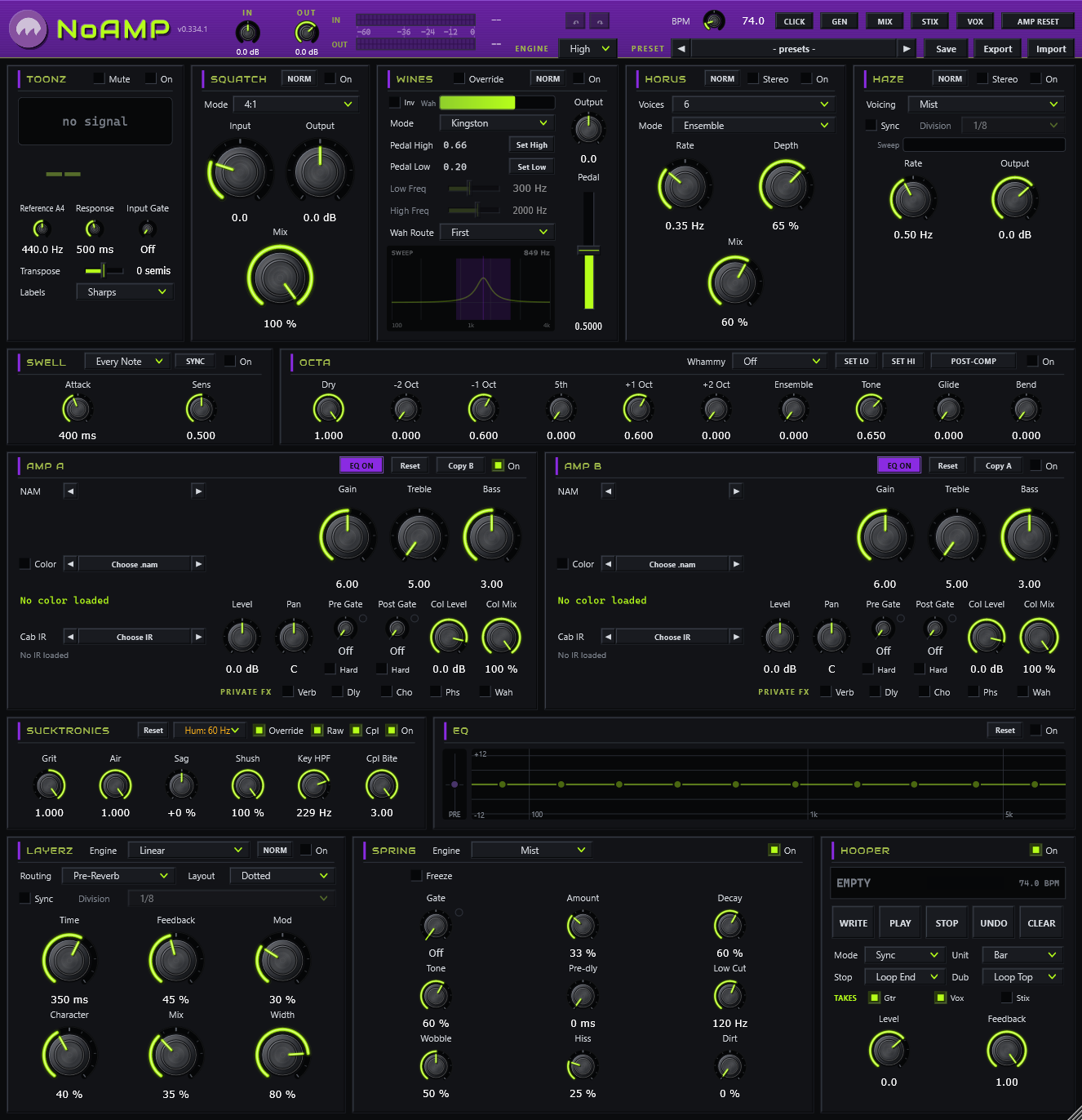
| Row | Cards |
|---|---|
| 1 | TOONZ · SQUATCH · WINES · HORUS · HAZE |
| 2 | SWELL · OCTA |
| 3 | AMP A · AMP B |
| 4 | SUCKTRONICS · EQ |
| 5 | LAYERZ · SPRING · HOOPER |
Every device has an On switch and starts off, except AMP A and SUCKTRONICS. A few cards have a NORM / NERD button: NORM is the simple face, NERD reveals the deeper controls. The button shows the face you're on. Which face each card shows is your preference, not part of a preset.
Double-click any knob to return it to its default. Right-click any knob or switch for MIDI learn and the GEN modulators (see MIDI).
IN › hum cancel › TOONZ (listens) › SWELL › SQUATCH › OCTA › WINES › HORUS › HAZE ›
AMP A ‖ AMP B (each: Pre Gate › Color › Post Gate › amp › EQ › cab IR) › Shush ›
LAYERZ › SPRING › EQ › OUT › HOOPER › MIX MASTER › click › safety limiter
Some stages can move. WINES has a Wah Route menu. HORUS and HAZE each have a Stereo switch that moves them after the amps. OCTA can sit after the compressor or just before LAYERZ. LAYERZ can go before or after SPRING. VOX and STIX run on their own buses and join at the HOOPER, so you can record them too.
| Control | What it does |
|---|---|
| Ill Sea logo / name | Click the logo, or right-click the NoAMP name, for the board’s menu: License (who it’s licensed to, Load license file..., Get licensed / free trial), Skins, Size, then Audio/MIDI Settings... in the standalone, or Click + MIDI clock... and Check for updates... in a DAW. The version number sits under the logo. |
| DEMO block | Only on an unlicensed copy: a black block over the NoAMP name with the minutes of demo audio left this session (MUTED once they run out). Click it to load a license file or get one. A licensed or trial copy shows nothing here; the License menu says who it’s licensed to and the trial’s days left. See License. |
| Control | What it does |
|---|---|
| IN | Input trim, −24 to +24 dB, the very first stage. Guitar only: the vocal mic is split off before it. |
| OUT | The guitar board's master, −24 to +12 dB. The same control as the GUITAR fader in MIX. |
| IN / OUT meter bridge | Stereo meters with a dB scale and the peak in numbers. A red block growing on the OUT meter means the always-on safety limiter is catching peaks: back off OUT or the amp Levels until it goes away. |
| ↶ ↷ | Over the ENGINE dial. Undo and redo the last knob or setting change. Ctrl+Z undoes; Ctrl+R (or Ctrl+Y, Ctrl+Shift+Z) redoes. Click the board first so it has the keyboard. See Undo and resets. |
| ENGINE | Eco, Low, High (default), Full. Some .nam files carry several trained sizes; ENGINE picks which one plays, trading CPU for detail. Ordinary captures are unaffected. A change applies at the next load. Global. Hover it to see how much of each audio block NoAMP is using. |
| PRESET | ◀ [name] ▶, Save, Export, Import. See Presets. |
| Control | What it does |
|---|---|
| BPM | The one tempo for everything synced (delays, phaser, swell, GEN, the looper grid, STIX), 40 to 300 BPM. |
| SYNC IN | In Audio/MIDI Settings (it left the header): FOLLOW HOST, on by default, makes the board’s tempo the DAW’s when it supplies one; otherwise the BPM knob rules. The knob greys only while the host is actually driving it. |
| CLICK | The metronome: a short click on the beat grid that never goes through the effects, is never muted by the tuner and is never recorded into a loop. Its level and output live in Audio/MIDI Settings (in a DAW: the logo's Click + MIDI clock...). It is always off when a session opens. |
| GEN | Opens the GEN modulators. |
| MIX | Opens the MIX window. |
| STIX | Opens or closes the STIX drum deck. |
| VOX | Opens or closes the VOX vocal channel. |
| AMP RESET | Resets the guitar board. See Undo and resets. |
The Options button in the standalone window's title bar, above the header. In a DAW, the Ill Sea logo's menu carries Skins, Size, the click and clock, and Check for updates.
| Item | What it does |
|---|---|
| License | Who it’s licensed to (or the demo time left), Load license file..., Get licensed / free trial. |
| Audio/MIDI Settings... | The board's one settings window: your audio device, sample rate, buffer, the input and output channels (tick a second output pair to give the click its own cue) and your MIDI inputs; GUITAR IN (In 1 + 2 stereo, or In 1 to 4), VOX MIC IN, Turn on 4 inputs and Mute audio input; the click's level and output (Mains, Cue L, Cue R, Cue L+R, for an earpiece); SYNC IN (FOLLOW HOST: in a DAW the board's tempo is the transport's); and SYNC OUT: MIDI CLOCK OUT with its own port. In a DAW the logo's Click + MIDI clock... opens just the click and the clock. |
| Skins | Skin: load a classic Winamp .wsz skin, unload back to the Illthy look, or pick one from Documents\Illthy\Skins. Color scheme: Illthy (lime + purple), Black Panel, Midnight, High Contrast (colorblind-safe), Light, Tweed. A loaded skin overrides the scheme. Manuals opens these pages. |
| Size | Fit this screen, or a fixed 70% to 160%. Double-click the header band to fill the screen's height and again to go back. |
| Save current state... / Load a saved state... | Write or read the whole app state as a file. |
| Reset to default state | A fresh board, as on first launch. |
| Check for updates... | Asks illsea.com whether a newer NoAMP exists. See Updates. |
A strobe tuner that listens to your input and never changes the sound. The screen shows the strobe, the note with its octave, cents and Hz. The note turns solid lime when you're within half a cent. On starts it listening (off costs nothing). Mute fades the guitar to silence while you tune; a playing loop, STIX and VOX keep sounding.
| Control | What it does |
|---|---|
| Reference A4 | Concert pitch, 415 to 466 Hz (default 440). |
| Response | How smoothly the readouts settle, 100 to 1000 ms. |
| Input Gate | Input quieter than this is ignored, −90 dB (Off) to −40 dB. |
| Transpose | Shifts the note names by −12 to +12 semitones for capo or drop tunings. |
| Labels | Sharps or Flats. |
The compressor: a fast feedback-style squeeze with a fixed threshold, plus a sustain-pedal style mode. NORM shows Input, Output and Mix; NERD adds Attack and Release. The same engine ships as Illthy Squatch.
| Control | What it does |
|---|---|
| Mode | 4:1 (default), 8:1, 12:1, 20:1, All (the slam: about 25:1, lower threshold, hard knee), and OTA, the sustain-pedal style. In OTA, Input becomes Sustain and Output becomes Level. |
| Input / Sustain | −12 to +36 dB. More drive into the threshold, more squash (in OTA: more sustain). |
| Output / Level | Makeup gain, −24 to +24 dB. |
| Attack (NERD) | 0 to 100%: about 20 to 800 µs (0.5 to 20 ms in OTA). |
| Release (NERD) | 0 to 100%: about 50 ms to 1.1 s, slower on held notes (150 ms to 3 s in OTA). |
| Mix | Parallel blend of dry and compressed (default 100%). |
A resonant wah swept by the Pedal fader or your expression pedal, with a live sweep display. NERD adds Wah Q, Wah Grit and Wah Sweep. Override makes the wah your global setting, so presets never touch it.
| Control | What it does |
|---|---|
| Mode | Kingston (smooth, moderate scream), Chicago (hot and vocal), Seattle (aggressive, with grit), Hollywood (even level across the sweep, no toe scream, quiet when parked), Manual (set your own range). Each mode remembers its own Output and Inv. |
| Pedal | The pedal position. Right-click to MIDI-learn your expression pedal. |
| Output | Wah level, −12 to +12 dB: effectively how hard it drives the amp. |
| Pedal High / Set High, Pedal Low / Set Low | Calibration: park your pedal at toe, press Set High; at heel, Set Low. You can also type the numbers. Calibration is global; presets never change it. |
| Low Freq / High Freq | The sweep range in Manual mode (50 to 1500 Hz, 500 to 5000 Hz). |
| Wah Route | First (before the chorus), After Haze, or Before Amps (just ahead of each amp's Color). |
| Inv | Reverses the pedal direction. |
| Wah Q / Wah Grit / Wah Sweep (NERD) | Resonance, added grit, and the taper of the sweep. |
More on expression pedals: tips. The same wah ships free as Illthy Wines.
A lush multi-voice ensemble with a shimmering top, plus two tremolos. NERD adds Tone and Feedback. Stereo moves the chorus after the amps onto the true stereo bus and shows Spread (before the amps the board is mono, so Spread would cancel). The same engine ships as Illthy Shimmer.
| Control | What it does |
|---|---|
| Voices | 2 to 6 (default 6). Ensemble mode only. |
| Mode | Ensemble, Trem (volume tremolo, Spread = auto-pan), Harm Trem (lows and highs pulse in opposition), Single (one classic chorus voice). Switching fades, so it never clicks. |
| Rate | 0.02 to 8 Hz. |
| Depth | How far the voices move. |
| Spread (Stereo) | Stereo width. |
| Mix | Wet added on top of a dry signal that always stays at full level. |
| Tone (NERD) | Dark to bright tilt on the wet. |
| Feedback (NERD) | Thickens toward a flange. At its minimum it reads Auto and follows Depth. |
A voiced phaser and a true through-zero flanger, with chaotic drift. Each voicing shows only the knobs it uses; the rest are voiced for you. NERD adds Spread and Regen. Stereo moves Haze after the amps, where Width really works. The same engine ships as Illthy Haze.
| Control | What it does |
|---|---|
| Voicing | Mist (gentle 4-stage), Swirl (hollow 4-stage), Cathedral (deep 8-stage), Storm (6-stage with heavy drift), Advanced (every control), Flange (through-zero jet, about 5 ms of latency). |
| Stages | Voiced, or 2 to 12 (Storm and Advanced). |
| Sync + Division | Locks the sweep to the tempo, 4/1 down to 1/16T. Rate greys while synced. |
| Rate | 0.02 to 10 Hz. |
| Depth | Sweep width. |
| Color | Feedback: sharper notches. |
| Width | Stereo sweep offset. |
| Haze | Chaotic drift, so the sweep never repeats exactly. 0 is perfectly regular. |
| Mix | Blend, level-compensated. |
| Output | Trim, −24 to +12 dB. |
| Spread (NERD) | Spacing between the notches. |
| Regen (NERD) | Drive inside the feedback loop. |
Automatic volume swell: every pick fades in like a bowed note.
| Control | What it does |
|---|---|
| Mode | Every Note: each pick restarts the swell. After Rest: a new swell only after a short silence. |
| SYNC | Times the swell to the beat: Attack then picks a note length, 1/1 down to 1/16T. |
| Attack | Swell length, 50 ms to 2 s (default 400 ms), or a note length with SYNC. |
| Sens | How easily a new pick restarts the swell. Low: only firm, separate picks. High: almost every note. |
An octave organ stack with a whammy sweep. Mix the voices like drawbars; rock an expression pedal on Bend for dives and drop-tuned chugs.
| Control | What it does |
|---|---|
| Dry | Your original note. |
| −2 Oct, −1 Oct, 5th, +1 Oct, +2 Oct | The stacked voice levels. |
| Ensemble | The organ chorus: a detuned pair under the stack, wider and louder as it comes up. |
| Tone | Sweeps the whole stack darker or brighter. |
| Glide | How fast the whammy chases the pedal: snap at 0, a slow half-second portamento at full. |
| Bend | The whammy sweep, heel to toe across the Whammy interval. Right-click to MIDI-learn your pedal. |
| Whammy | The interval Bend sweeps: Off, or up or down by 1 to 12 semitones. For the classic dive: Dry down, +1 Oct up, pick −12, rock the pedal. With a down interval the dry note itself bends, so chords and chugs drop-tune. |
| SET LO / SET HI | Calibrate your bend pedal: park it at heel, press SET LO; at toe, SET HI. |
| POST-COMP / PRE-LAYERZ | Where the stack sits. POST-COMP feeds the amp (octaves get amp grit). PRE-LAYERZ lays clean stacks over the finished tone, straight into delay and reverb. |
Two independent amps, each with its own capture, dirt, cab, gates and tone. AMP A starts on, AMP B off.
| Control | What it does |
|---|---|
| EQ ON / EQ OFF | ON: Bass, Mid and Treble shape the capture. OFF: the tone stack is bypassed and the capture passes through untouched (Drive still works). |
| Reset | Every setting on this amp back to default, and its NAM, Color and IR unloaded. |
| Copy B / Copy A | Copies the other amp's whole setup onto this one, files included. Pan stays put. |
| On | Turns this amp on or off. On with nothing loaded passes your dry signal. |
| Control | What it does |
|---|---|
| Drive | How hard the signal hits the capture, 2 to 10. 6 is unity; each step is 3 dB. |
| Bass / Mid / Treble | An interactive passive tone stack after the capture, like a real amp: the knobs load each other, so pulling Mid down scoops. 0.500 on all three is the natural voicing. |
| Level | Amp output, −24 to +24 dB. |
| Pan | Where this amp sits. On AMP B, right-click Pan for STEREO OFFSET (Off, 5 to 30 ms, or Custom up to 40 ms): a short delay on B for a wide double. The caption then reads Pan +Xms. |
| Pre Gate / Post Gate | The gates: see The gates. |
| Col Level | Trims the Color capture's output, −36 to +6 dB. |
| Col Mix | Blend of the Color output and your clean signal. 100% (default) is a full pedal in series. |
Each amp has two noise gates. Pre Gate works on your clean input, before Color. Post Gate sits after Color, before the amp, and only runs while Color is on. Both listen to your clean guitar, taken after the hum canceller and before the compressor, so neither the dirt nor the compressor can hold them open.
The PRIVATE FX row on each amp card: Verb, Dly, Cho, Phs, Wah. Turning one on gives that amp its own copy of the board's SPRING, LAYERZ, HORUS, HAZE or WINES, using that card's current settings. The effect leaves the shared path, so the other amp no longer gets it. Claim the same effect on both amps and each gets its own. Wah, Cho and Phs run before the amp; Dly and Verb after it.
Each card's On is a master for its private copies: switch SPRING, LAYERZ, HORUS, HAZE or WINES off and every private copy of that effect fades out too. Switch the card back on and they return, starting clean.
The analog bits around both amps: transformer weight, power-supply sag, top-end air, a noise filter, the hum canceller and the dirt-into-amp coupling. It is on by default.
| Control | What it does |
|---|---|
| Reset | Every SUCKTRONICS knob back to default, Cpl off, Key HPF 120 Hz, Hum off. |
| Hum | Off, 60 Hz or 50 Hz (your mains). An adaptive canceller that learns the hum's exact level and phase at each harmonic between phrases and subtracts it, leaving no hole in your tone. Give it a second of not playing to lock on: amber while learning, lime once locked. |
| Override | On by default: the whole strip becomes your global setting, so presets can't change it and it follows you between sessions. |
| Raw | Turns off capture leveling for every capture. See Capture leveling and Raw. |
| Cpl | The dirt-into-amp coupling. See below. |
| On | Off stands the whole strip down: every knob, Cpl, Key HPF, the hum canceller, Raw and Override do nothing. |
| Control | What it does |
|---|---|
| Grit | −1 to +1. Right of centre: output-transformer weight, a low-end bloom that eases as you dig in. Left: a tighter low end. |
| Air | Presence, a top shelf and a gentle glow together. |
| Sag | Right: power-supply sag, a level-following dip of up to 3 dB. Left: the opposite, up to 3 dB of push. |
| Shush | A dynamic noise filter after the amps: closes the top in quiet passages. 0 is Off. |
| Key HPF | Where every gate's detector stops listening, 40 to 400 Hz (default 120). Only the detector is filtered, never the sound. Raise it toward 300 to 400 Hz so mains hum can't hold the gates open. |
| Cpl Bite | How firm the coupling's squash is, 0.6 to 3.0. 1.6 is the classic feel; lower is rounder, higher is harder. |
Run a real pedal into a real amp and the two load each other: some low end never makes it across, some top end rolls off, and when the pedal drives the amp hard its first stage gives way and squashes. Two captures in series don't do that, because a capture only knows the signal it was fed. Cpl puts that missing interface between your Color and your amp. It needs Color on and ships off, so the default path is unchanged. Turn it on when a dirt-into-amp pairing sounds right on paper but lifeless in practice; Cpl Bite sets how hard the amp leans back.
A 10-band board EQ after everything, after the delays and reverbs and before the master. Each band moves ±12 dB.
Three delays behind one Engine menu. Switching engines fades over 30 ms and keeps the delay memory, so a tail carries across. On fades the wet out; turning it back on starts clean.
On every engine: Routing (Pre-Reverb or Post-Reverb, around SPRING), Sync (time follows the tempo; up to 4 seconds) and Division (1/1 down to 1/16T).
Two taps, musical layouts, darkening repeats and converter grit. NERD reveals the deeper controls. This engine also ships as Illthy Layerz.
| Control | What it does |
|---|---|
| Layout | Slap (one centred tap), Ping-Pong (repeats bounce), Dotted (Time left, 1.5× Time right), Chorus (short doubling taps), Wash (two detuned taps), Reverse (plays the memory backwards in slices). |
| Time | 20 to 1500 ms (greyed under Sync). |
| Feedback | How many repeats. |
| Mod | One knob of warble, rate and depth together. |
| Character | Converter grit; 0 is pristine. |
| Mix | Wet added on top; the dry stays at full level. |
| Width | Stereo spread of the wet. |
| NERD: FB Drive, Repeats LC, Bandwidth, Repeat Dmp | Saturation in the loop, a low cut on the repeats, a high cut into the delay, and darkening per pass. |
| NERD: Mod Wave, Bit Depth | Triangle or Sine; 16, 12, 11 or 8 bits (heard through Character). |
| NERD: Freeze | Mutes the input and holds the wash near unity while you play over it. |
Quantum slices what you play into the tempo grid and, on any slice, may do something to it: stutter it, ratchet it, reverse it, pitch it, warp it (tape stop or spin-up), skip back to an earlier phrase, drop it out, smear it into a grain cloud, hold it, or diffuse it into a small wash. A slice is the Division under Sync, or Time. Under Sync the pattern repeats bar to bar; right-click the Engine menu to roll the dice for a new one.
| Control | What it does |
|---|---|
| Mode | The behaviour: Stutter, Reverse, Pitch, Smear, Chaos, Slice. Each sets how likely each kind of event is. Slice is a rhythm gate instead: right-click the Engine menu for its patterns (Straight, Offbeat, Gallop, Push, Random). |
| The screen | A time map of what is in the delay, with three nodes you drag anywhere. Lime: left and right = Time, up and down = Feedback. Purple: left and right = Chaos (how often events happen), up and down = Warp (the shapes: triplets, swing, and toward reverse, pitch and smear). Amber: Mix and Width. Right-click a node to MIDI-learn its left-right axis; Alt + right-click learns up-down. |
| Freeze | Holds the memory; the grains scan it at Warp speed. |
| Pitch | The intervals the Pitch event draws from: Octaves, Fifths (default), Chromatic, Pentatonic. |
| Bits | 16, 12, 11 or 8: the grit. |
| Tiles | Click or drag along a tile; double-click to type. Duck (the wet steps back while you play), FB Drive, Repeats LC, Bandwidth, Repeat Damp, and Window (3 to 16 seconds of history across the screen). |
A vintage tape echo with a sliding record head. Turn Delay and the head slides at hand speed, so the repeats swoop in pitch like the real thing. The wet is mono and centred.
| Control | What it does |
|---|---|
| Condition | How well kept the machine is: Mint, Studio, Gigged, Worn. Sets wow, flutter, hiss, how dull the tape is, dropouts and the splice thump. |
| Delay | Head distance, 20 to 1500 ms, or a Division under Sync. |
| Repeats | At the top it pushes past unity into tape saturation instead of running away. |
| Record | Record-amp drive into the tape, clean to saturated. |
| Echo | Wet level. |
| Instrument | Your dry level under the echo (100% = unity). |
Five reverbs behind one Engine menu. Turning SPRING off fades the wet out with no ringing tail; turning it on clears the old tail and fades in from dry. A wet level match keeps the reverb sitting at your playing level, so raising Amount thickens the sound instead of dropping it.
| Shared | What it does |
|---|---|
| Engine | Tank (default): a dispersive spring tank, the chirp and boing. FDN: a smooth room or hall. Convolution: load any reverb IR. Bloom: the ambient shimmer tank. Mist: a diffuse, softly moving hall with a slightly grainy sheen (the same engine as ChordThing's Mist). |
| Gate | A noise gate on what enters the reverb stage, −80 dB (Off) to −24 dB, with the same tick, LED and Set from noise floor as the amp gates. |
| Amount | Equal-power dry/wet. |
| Decay | Tail length (Bloom: about 1 to 300 seconds; 50% is about 6 s). |
| Tone | Brightness. |
| Pre-dly | 0 to 200 ms before the wet arrives. No added latency. |
| Low Cut | High-pass on the wet, 20 to 500 Hz (default 120). |
| Engine | Its own controls |
|---|---|
| Tank | Dispersion (chirp intensity), Boing (the drip your pick attack excites), Sustain (the ceiling for Decay). |
| FDN | Width, Density (diffusion and early reflections), Mod (slow motion against metallic ring). |
| Bloom | Shimmer (how much of each pass returns pitch-shifted), Mod, High Cut, Swell (a new phrase fades into the reverb), Duck (the wet steps back while you play), Size (half length, a dense room, to double, a cathedral; turning it while a tail rings bends its pitch), and the Voice menu: Glass (octave-up halo), Choir (octave plus fifth), Grotto (octave down, dark), Haze (unison detune), Waves (octaves up and down with a slow breathe). |
| Mist | Decay sets how long the loop rings and Tone how bright it stays. Slow internal motion keeps the tail from ringing metallic. A cassette sits on the reverb: Dirt sets how much of the reverb goes through it (0, the default, is the clean Mist), Wobble is the tape's wow and flutter and also gives the reverb a fine grain (fewer bits), and Hiss is tape noise inside the reverb that also lowers its sample rate a little. Both crushes are set for guitar: subtle, and they never touch the body of your tone. The tape part of each knob is all the way in by about three quarters; the crush keeps growing to the end of the knob. The hiss rides the tail and fades away with it, so your dry sound stays clean. The amps' private reverbs run Mist too. |
| Convolution | ◀ Load IR ▶ Clear and the file name; IR Level trims the wet, which is already auto-leveled. No IR loaded means no reverb. |
Freeze (FDN, Bloom and Mist) captures what is ringing and turns it into an endless pad at the same level. You hear the held chord directly, with the reverb on top, and you can play over it. It fades in and releases smoothly.
Many of these engines also ship as Illthy Springs.
The last stage of the board, so it records what you hear. Up to 2 minutes. Presets and AMP RESET never touch a playing loop. The loop audio isn't saved with your session.
| Switch | What it does |
|---|---|
| WRITE | Press 1 records (under Sync, from the nearest grid line). Press 2 closes the loop and plays. Then it toggles overdub in and out. Leave a dub open past the end and the loop multiplies. From stopped, it restarts from the top with a new dub. |
| PLAY | While rolling, pauses at once. From stopped, restarts from the top. During the first take, closes the loop and parks it. |
| STOP | Only ever stops, at the Stop setting. Safe to stomp. |
| UNDO | During the first take, cancels it. During a dub, scraps that pass. Otherwise toggles the last layer out and back in. After a CLEAR, brings the loop back. |
| CLEAR | Wipes the loop: now, or at the Stop boundary while it plays (tap again to clear now). UNDO brings it back. |
| On | Arms the looper. Its 2-minute memory is set aside the first time you turn it on; while it is off the buttons still work but the loop is silent. |
| Setting | What it does |
|---|---|
| Mode | Sync (default) puts record, close, stop and restart on the grid. Free acts the moment you press. |
| Unit | The grid: Bar or Beat. |
| Stop | Next Bar, Loop End, Instant, Next Beat. |
| Dub | Loop Top: an overdub starts at the top and ends at the end. Instant: it starts now. |
| TAKES | What gets recorded: Gtr, Vox, Stix. You always hear all three. A muted MIX strip isn't recorded. |
| Level | Loop playback, −24 to +12 dB. |
| Feedback | How much of the older layers survives each dub; 1 stacks losslessly. |
The screen shows the state (EMPTY, REC, PLAY, DUB, STOP, and queued forms like DUB @TOP or CLOSE @BAR), a playhead, and the tempo. Short flashes confirm things: SCRAP, BACK, CLEAR, MAX (2 minutes reached), BUSY (tap again). Button lights: WRITE red while recording, PLAY lime while playing, UNDO lime with the layer in and purple with it out.
In a DAW the looper follows the transport's tempo and bars; on its own it follows the BPM knob and the STIX bar. Map all six buttons to footswitches with right-click MIDI learn. Momentary and latching switches both work.
Two LFOs and an envelope follower that can move almost any knob on the board. The GEN window shows them; they keep running with it closed.
| Modulator | Controls |
|---|---|
| LFO 1, LFO 2 | Rate in note values (8 bars down to 1/16T, synced to the board), or in Hz with FREE on (0.02 to 20 Hz). Shape: Sine, Tri, Saw, Square, S&H. Phase: 0 to 360°. |
| ENV | Follows a source, Gtr, Vox or Stix: Attack (1 to 500 ms), Release (10 to 2000 ms), Sens. |
To modulate a knob, right-click it: Map LFO 1, Map LFO 2 or Map Envelope, then Depth (10 to 100% of the knob's travel) and Invert. The knob's own position is where the sweep starts; it sweeps up, or down with Invert. Move the knob by hand to move the starting point. Unmap returns it. Mappings are saved in presets. Three LEDs in the window show the live values.
A six-strip mixer for everything NoAMP makes. Each strip has a fader, a stereo meter after the fader, and a badge. Every fader and badge is MIDI-learnable. Presets never touch any of it.
| Strip | What it controls |
|---|---|
| GUITAR | The guitar board, −24 to +12 dB. The same control as the header OUT knob. MUTE badge. |
| VOX | The vocal channel, −60 to +24 dB. MUTE. |
| STIX | The drum deck, −60 to +12 dB. MUTE. |
| HOOPER | Loop playback, −24 to +12 dB. MUTE. |
| CLICK | The metronome, −36 to −6 dB. Its badge is ON, the same switch as the header CLICK. |
| MASTER | Everything after the looper and before the click, −60 to +6 dB (Off at the bottom). MUTE. |
Mutes fade in 15 ms, and a muted channel isn't recorded into the looper.
A drum machine built into the board: seven synthesized drum voices that you can swap for samples, four patterns per beat, factory kits and beats, and its own console. The STIX header button floats it in its own resizable window. STIX comes with NoAMP.
| Control | What it does |
|---|---|
| ▶ / ❚❚ | Play and pause. If the looper is rolling, the kit starts on the next beat. |
| STOP | Stops and rewinds to bar 1. |
| Pattern A to D | Which pattern you see and edit. |
| Chain | A plays the selected pattern; A B, A B C D and A A B B walk the patterns, a bar each. |
| FOLLOW | The grid shows the pattern that is playing. While you edit, the view holds for a few seconds. |
| TAP | Tap tempo: averages your last taps and sets the board's BPM. |
| LINK | Kit follows looper: the kit starts and stops with the looper's PLAY, WRITE, STOP and CLEAR. |
Kit... loads one of 15 factory kits: every knob on every sound moves to that voicing, and what the kit plays stays. Kit Level (the MIX STIX fader) is yours: changing kits never moves it. Stacked Samples is a set of layered recordings, each built from several of our own hits. In every factory kit the synth sits on its samples’ own notes, so lowering Sample Mix brings the synth in already tuned. On the hats and cymbal the synth layer is as loud as the samples, so Sample Mix near the middle is an even blend there. Four kits are drum machines, all synth: Analog Machine plays the analog models (see Model under THIS SOUND); Steel Box is a raw analog box recorded close, loud and dry; Machine Room is a machine played through a PA into a big room; Shrapnel is abrasive, crushed and driven. The factory kits are level-matched, so changing kits keeps your volume; Brush Room is a little quieter on purpose. Kits and sessions saved with an earlier version load sounding exactly as they did. Beat... loads one of 63 factory beats in eight styles (Rock, Alt / Indie, Practice, Funk / Groove, Reggae / Ska, Heavy, Punk / Post-Punk, Waltz / Triplet) into patterns A to D, with its swing and grid. Both can be undone.
The KIT and BEAT rows are eight slots each for your own. Click STORE, then a slot. Tap a slot to recall it: a beat recalls at once while stopped and on the next bar line while playing. Right-click a slot to recall, store, rename, clear it or open the Stix folder. BEAT slots can be triggered from MIDI.
Seven rows: Kick, Snare, Low Tom, High Tom, Closed Hat, Open Hat, Cymbal. Click a step to cycle off, half hit, full hit. Ctrl-click sets a half hit; drag paints full hits; right-drag erases. Right-click a step for an Accent Hit (purple, played at the Accent level).
Right-click a row to Load sample... (wav, aiff, flac, mp3, ogg), add a SOFT-hit or HARD-hit layer, go Back to the synth voice, learn a MIDI pad, fill the row every step, 2nd or 4th, or clear it. A learned pad plays its drum with your velocity, even while the kit is stopped.
| Button | What it does |
|---|---|
| Copy / Paste | Copy the pattern you're viewing into another. |
| Undo / Clear | Undo grid edits (16 levels); clear the pattern you're viewing. |
| Sw 1/16 | Sw 1/8 | Which notes Swing pushes. |
| 4/4 | 3/4 | 4/4 trip | The grid: 16 steps, or 12 for 3/4 and triplets (Swing is off on the triplet grid). |
The page STIX opens on. Tap a sound's name to switch to THIS SOUND; tap again to come back.
| Control | What it does |
|---|---|
| Kit Level | The kit's output, the same control as the MIX STIX fader. Loading a kit never moves it. |
| Filter | Left of centre: low-pass, muffled and grimy. Right: high-pass, hollow and thin. Centre is off. |
| Tune | Tunes the whole kit, keeping each drum's pitch relative to the rest. Root under it shows the kick's note. |
| Swing | 50% is straight; up toward 67% is a triplet feel; below 50% rushes. |
| Human | How much the kit stops playing every bar the same way: feel, timing and tone per hit. Ghost notes appear past halfway. |
| Stick | How hard the beater is: the strike, not the tone afterwards. |
| Accent | How loud Accent hits are. |
| Crush | Bit and sample-rate crush for the kit. |
| Squash | A smashed copy of the kit brought back up under it: the body and tails come up while the fronts of the hits stay. 0 is off. |
| Tape | Tape on the whole kit, after Squash: the loud hits thicken and round off, the low end fills, the very top softens, and a gentle clipper catches the peaks. 0 is off. |
| Verb | Reverb for the whole kit: a short drum room, a little behind the hits and kept out of the low end so the kick stays clear. |
| Room | One shared room, the early reflections that glue the drums into one instrument. |
| Damp | How fast the cymbals and hats darken as they ring. Centre is the kit as built; right stays bright; left goes dark and close. |
| Width | Spreads the hats, the cymbal and the toms across the stereo field. It folds back to mono cleanly. 0 is off. |
Under the knobs, the kit's console: a NAM card runs the whole kit through one capture (on the centre of the image; the sides stay dry), with MIX %; an IR card adds a room or cab, auto-leveled, with AMT %. Each has ◀ Choose ▶ and a screen.
| Control | What it does |
|---|---|
| Model | The menu beside the sound’s name: the synth this sound uses. Classic is the original voice. Kick: Deep, Analog, Synthetic. Snare: Snappy, Analog, Synthetic. Toms: Membrane, Analog, Modal. Hats and cymbal: Metal, Analog, Ring. Each lands near Classic’s level, so you can switch while it plays. Sessions and kits saved before this open on Classic. |
| Level / Pan | The sound's level and place. Stereo samples keep their width; for them Pan is a balance. |
| Pitch | ±12 semitones, with the note it lands on. |
| Attack | 0 is the bare transient; up is a softer swell, on synth and sampled sounds alike. |
| Decay | Shorter or longer ring; on the kick and toms it also changes the ring’s character. Sampled sounds otherwise ring their full natural length. Older sessions and kits load with every Decay at 1.0, which is what they sounded like. |
| Comp | One-knob compressor for this sound. |
| Crush | Bit crush for this sound. |
| Verb | Centre: only the whole-kit Verb. Right: adds this sound's own reverb on top. Left: pulls this sound out of the kit reverb, all the way to none. Double-click for centre. |
| Echo | A send into a tempo-synced dotted-eighth tape echo: each repeat a little darker. |
| Tone | Brightness of the synth layer. Centre is the sound as designed. |
| Character | Its name says what it does on this sound and model: Click (the strike’s click, on Classic), Drop (how far and how long a Deep kick’s boom falls), Punch (the attack’s pitch punch, then the body’s growl), FM (how much a Synthetic kick’s pitch is swept), Snappy (wires against the shell), Strike (where a Membrane tom is struck: centre to near the rim), Structure (a Modal tom’s material: wood, skin, bell), Shape (a Metal cymbal from ride to crash) or Noise (noise against the metal’s tones). |
| Drive | Saturation on the whole sound, synth and sample: the loud part of each hit thickens. 0 is off. |
| Snap | The attack of each hit: right sharpens it, left softens it. Centre is off. |
| Synth Tune | Under Pitch: ±24 semitones for the synth layer only. On a kick, snare or tom with a sample loaded, the synth starts on the sample’s own note (measured when the sample loads), so a hybrid is in tune from the start and Pitch moves the sample and the synth together; Synth Tune is then an offset from the sample’s note (0 is in tune, −12 is a sub an octave under it). Hats, the cymbal and sounds with no sample offset from the sound’s own note. The note readout under Pitch follows it. Sessions and kits saved before this keep their old tuning. Double-click resets to 0. |
Every hit lands exactly on the grid at any buffer size, and the closed hat chokes the open hat with a short fade, sampled ones and every model included.
A vocal channel for a mic on your interface: EQ, compression, pitch correction, four harmonies, effects and feedback protection. The VOX header button floats it in its own window. VOX comes with NoAMP.
| Control | What it does |
|---|---|
| On | Turns the channel on. It is always off when a session opens. |
| FB Guard | Watches for feedback: closes the gate on a sustained ringing tone, and if it still runs away, ducks the vocal and pulls the echo and reverb back. The FEEDBACK readout shows what it is doing. |
| Decks | ◀ [deck] ▶, Save, Del. Twenty factory decks in five groups: Clean, Edgy, Tuned, Harmony. Your own decks appear below and only those can be deleted. A deck never changes Mic Gain, On or the input. |
| RING OUT | Finds the frequencies that ring in your room and parks up to 8 notches on them. It warns you first: it is loud. |
| SET MIC | Sing at your loudest for three seconds. It sets Mic Gain, the Gate and Output, and learns your mic's noise for Denoise. |
| Mic | Which input the mic is on, In 1 to 4 (in a DAW, In 1 or In 2). |
| TUNE | FX | The two pages. |
Always visible, with a live spectrum and IN / OUT meters. Drag a dot sideways for frequency and up or down for gain; the wheel on a bell sets its range; double-click resets.
| Dot | What it is |
|---|---|
| LC | Low cut, 40 to 300 Hz. |
| LO / MID / HI | Bass, mid and treble, each with its own frequency and range. |
| HC | High cut, 2 to 20 kHz (Off at the top). |
| PRE | Mic Gain, −24 to +48 dB. |
| POST | Output level: the same control as the MIX VOX fader. |
| Control | What it does |
|---|---|
| Denoise | After SET MIC has learned your mic's noise, subtracts that floor band by band. |
| Comp | One knob of compression: how held the voice is. |
| Capture loader | ◀ Choose .nam ▶: load a capture as the vocal compressor, with a wet/dry slider. It takes over the Comp knob; clear it to go back. |
| Verb | Reverb amount. Its label is a menu: Plate, Tank, Bloom. With Decay, Vb Tone, Pre-Dly and Duck (the reverb steps back while you sing). |
| Echo | Echo amount. Its label is the note value, 1/1 down to 1/16T, synced to the board. With Echo Fb and Echo Tone (left gets darker every repeat, right stays clear). |
| Chorus, Chor Rate, Chor Depth | A three-voice ensemble. |
| Double | A slow, deep second take underneath you. |
| Width / Pan | Stereo width and the channel's pan. |
| Drive | Soft saturation, thickness into grit. |
| De-Ess | Tames the S: only the sibilant band moves. |
| Squash | A peak limiter on the way out. |
| Expand | How far the channel closes when nobody is singing, 0 to 36 dB (default 24). |
| Gate / Hard / Gate Rel | The walk-away gate (−80 = Off). Without Hard it dips the channel; with Hard it closes fully. Gate Rel sets how fast it closes after you stop. |
The note screen shows what it hears (like A3+12) and turns lime while it corrects.
| Control | What it does |
|---|---|
| Tune | Correction strength: 0 is off, 1 is a hard snap. |
| Speed | Low is a robotic snap, high is a gentle glide. |
| Mix | Corrected and dry blend. |
| Harm | Harmony level for all four voices. |
| Human | Tiny opposing detunes so the harmonies sound sung, not stacked. |
| Key / Scale | C to B; Chromatic, Major or Minor. |
| Mode | Scale: harmonies stay in the key. Chord: they follow a chord you choose (Quality: Maj, Min, 7, Maj7, Min7, Sus4, Dim). Guitar: the chord follows your guitar. |
| Voices 1 to 4 | Each has an interval (Off, Unison, or up and down to an octave), a Level and a Pan. A centred voice follows the lead's chain; a panned voice joins in stereo. |
Captures are not recorded at a consistent level: two files of the same amp can differ by more than 25 dB. So NoAMP measures every capture you load, both amps and both Color slots, and brings it to a common loudness (about −18 dBFS average), capped so its peaks stay at or below −8 dBFS. With both amps on, each is turned down 3 dB so the pair stays clean. That's why you can audition twenty captures in a row at a usable volume.
Raw (in SUCKTRONICS) turns all of that off at once. You hear each capture at its own untouched level and gain-stage by hand with the amp Levels and OUT. Expect big jumps between files. Raw is a preference, not a preset value, and only works while SUCKTRONICS is on.
NoAMP ships no factory presets and no amps. The PRESET bar is for sounds you build.
%AppData%\IllSea\NoAMP\Presets as .pig files. Paste that into Explorer's
address bar to back them up or drop a friend's in.A preset stores the guitar board: every card's knobs and switches, the GEN mappings, and the paths of both amps' NAM, Color and IR files. Presets remember files by path, so keep your captures where they are. These ride over every preset on purpose, so a preset change never surprises you: the looper, tempo, the click, MIDI clock, the MIX faders and mutes, input routing, the whole VOX channel, the whole STIX deck, pedal calibration, ENGINE, Raw, and WINES or SUCKTRONICS while their Override is on.
Undo covers the knob and setting changes you make by hand, up to 200 steps. Loading a preset, a deck, a kit or a reset counts as one step. Moves from GEN, MIDI and the looper's buttons aren't recorded, and undo doesn't reload files.
| Reset | What it does |
|---|---|
| AMP RESET | The guitar board back to defaults: every amp and effect knob, all NAMs and IRs unloaded, IN, OUT and ENGINE reset, Raw on, both amps' EQ off, and the looper on, stopped and cleared. VOX and STIX are untouched (STIX keeps playing unless LINKed). Tempo, the click, MIX and input routing stay, and so does SUCKTRONICS while its Override is on. |
| Reset on an amp | That amp's knobs to default and its files unloaded. |
| Reset on SUCKTRONICS | Its knobs to default, Cpl off, Hum off. |
| Reset on the EQ | Every band and the preamp to 0 dB. |
| Double-click a knob | That knob to its default. |
Right-click almost any knob, fader, switch, MIX badge or preset arrow → MIDI Learn..., then move a controller: the next CC binds. The channel doesn't matter. Learning a CC that was already bound moves it to the new control. Clear mapping and Clear ALL MIDI mappings undo it. STIX pads learn notes instead, from the grid's row menu.
| SWITCH mode | For on/off controls: Auto (recommended) tells a momentary footswitch from a latching one; or force Momentary, Latching, or Absolute (follow the value). |
| KNOB mode | For knobs: Jump (default, follow the controller), Pickup (wait until the controller passes the knob's value), Scaled (move toward it, never jump). |
| Also in that menu | The GEN mappings (see GEN), Set from noise floor on gate knobs, and STEREO OFFSET on AMP B's Pan. |
| MIDI clock out | In Audio/MIDI Settings (in a DAW: the logo’s Click + MIDI clock...): 24 ppqn to a MIDI port of your choice, following the board's tempo. In the standalone, STIX's Start (with song position 0 and the first tick) leaves 15 ms ahead of its first hit, so a receiver has time to land its own first beat on STIX's; a receiver with a matching start-lead setting (ChordThing: Clock start lead, 15 ms) lands it exactly. |
| Hot-plug | In the standalone, unplugging and replugging your interface or MIDI devices is picked up and recovered on its own. |
Your MIDI map is machine-wide. Where learn works in each host, the Ableton way, and the USB-sleep fix for footswitches that go silent: tips.
Your license is a small signed file, NoAMP.noamp-license, checked fully offline. Double-click it once
(or drop it on NoAMP, or load it from the License menu); NoAMP keeps its copy in %AppData%\IllSea\NoAMP. The address it was sold to is signed into it.
| State | What happens |
|---|---|
| Licensed | Everything plays, forever. |
| Trial | Everything plays; the License menu counts the days left. |
| Unlicensed or expired | 10 minutes of full audio per session, then the output fades to silence. Load a license and sound returns at once. Setting the clock back doesn't add time. |
STIX and VOX come with NoAMP: they play with every license, during a trial and in the demo minutes, like the rest of the board.
Your license covers every future version of NoAMP and every module in the zip. Check for updates... (the standalone's title-bar Options menu, or the Ill Sea logo's menu in a DAW) asks illsea.com which version is newest and tells you whether you're up to date. If a newer one is out it offers Open download page; nothing downloads by itself. That one request, made only when you click, is the only time NoAMP touches the network. Install the new zip over the old one; your license keeps working.
Across sessions and presets: your MIDI map with its switch and knob modes, pedal calibration, ENGINE, Raw, the WINES and SUCKTRONICS overrides, tempo and SYNC, the looper's settings, input routing, the click, MIDI clock, the color scheme or skin, which cards show NERD, the standalone's window size and position, and the folder every file browser last opened. VOX opens off and STIX opens stopped at every session start.
Run a 256-sample buffer at 48 kHz. That's the tested sweet spot: about 5 ms each way, tight enough to play and roomy enough for the whole board, both amps, STIX and VOX. Mixing where latency doesn't matter? 512 buys extra safety. 128 works on faster CPUs.
A 4-core desktop CPU around 4 GHz (a 2015-era i7 class) or anything newer runs the whole board at 256. NoAMP spreads its heaviest work, AMP B and the STIX bus, across separate cores, so core count matters more than raw clock. In the standalone the audio thread runs at Windows' pro-audio priority. Hover the ENGINE dial for the live readout: the peak block time against what's available, how many blocks came close, and which stage is spending it. Long IRs on the STIX console cost more than cab-length IRs and are happiest at 256 and up.
| Amps | 2 × NAM capture slots, folder stepping, click-free swaps |
| Dirt | 2 × Color capture slots before the amps, with a modeled dirt-into-amp coupling |
| Cabs | 2 × IR loaders (.wav, .aiff, .flac, any length), partitioned convolution |
| Board | tuner, compressor, wah, chorus, phaser/flanger, swell, octave stack, electronics, 10-band EQ, 3-engine delay, 5-engine reverb, looper |
| Around it | STIX drum machine, VOX vocal channel, 6-strip MIX, GEN modulators (2 LFOs + envelope) |
| Leveling | −18 dBFS average target, peaks ≤ −8 dBFS, dual-amp −3 dB, defeatable (Raw) |
| Output | always-on safety limiter, metering after it |
| Tempo | one BPM, host sync or manual; MIDI clock out |
| Engine | multi-core (AMP B and STIX on their own cores), per-stage load readout |
| License | offline Ed25519-signed file; the only network request is Check for updates, made only when you click |
| Formats | VST3 + standalone, Windows 64-bit, 44.1 / 48 kHz tested, signed by ILL SEA LLC |